 PPFTEC
Atlassian Forge app for Confluence Cloud
Markdown Mode for Confluence
Edit Confluence pages in Markdown and turn ChatGPT, Claude or GitHub Markdown into real Confluence pages. Macros stay intact.
Coming soon to the Atlassian Marketplace. 30-day free trial, then $5 per month for up to 10 users and $0.50 per user above that.
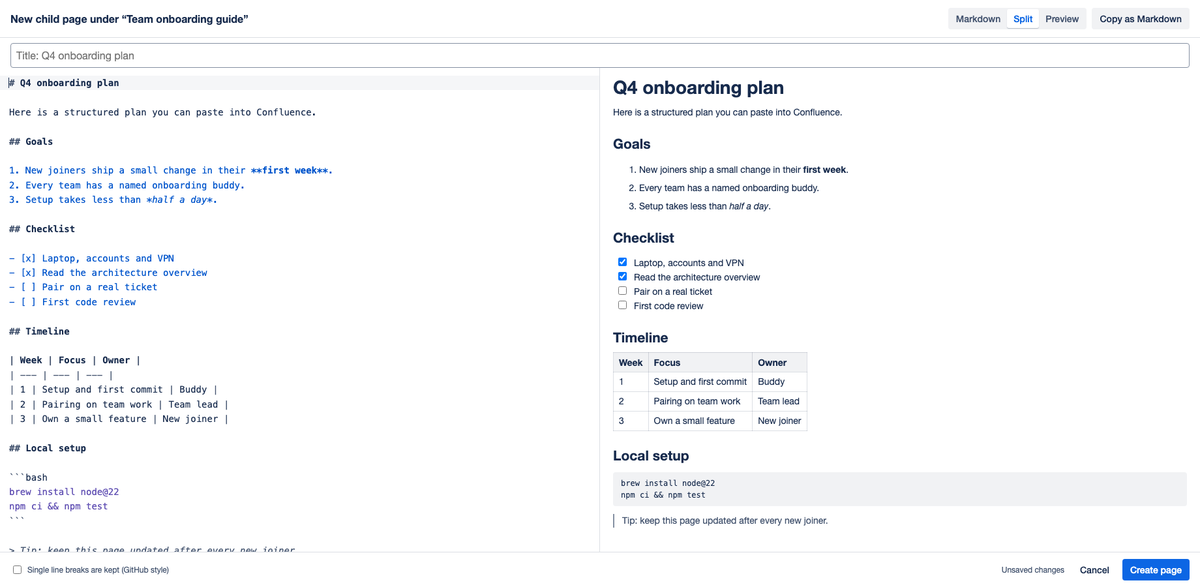
Paste Markdown, publish a real page
Paste an answer from ChatGPT, Claude or a GitHub README. Headings, lists, task lists, tables and code become native Confluence content. Create it as a new child page or publish it into the current page.
Macros, layouts and images survive
Open any page written in the Confluence editor. Columns, panels, mentions, status and dates become readable Markdown; macros and attachments are kept as protected blocks and published back unchanged.
Your content stays in Confluence
The editor runs in your browser inside Confluence and talks only to Confluence, as you, with your permissions. No servers of ours, no storage, no tracking. Every save is a normal page version.
What it adds to Confluence
Confluence's editor is rich text only. If you think and write in Markdown, or you draft with an AI assistant, you end up re-formatting by hand. Markdown Mode for Confluence adds two actions to the page ••• → Apps menu:
- Edit in Markdown: the page or blog post as Markdown, with a live preview. Publish creates a normal new page version.
- New child page from Markdown: paste a document, give it a title (or let the first
# Headingbe the title) and create it under the current page.
Both publish native Confluence content, so readers without the app see a normal page, search works, and page history, compare and restore work as usual. Copy as Markdown gives you any page as Markdown for GitHub, notes or an AI prompt.
Page layouts become editable ::::layout / :::column blocks. Mentions, status, dates, panels and expands become short, readable tags. Macros, attachments and decisions are kept as protected blocks and published back unchanged. Before publishing, the app checks for a newer version and warns you about unpublished changes in the Confluence editor. If you are not allowed to edit a page, the editor opens read-only.
How it handles your data
- The app is built on Atlassian Forge and runs on Atlassian's platform. It has no backend and no servers operated by PPFTEC.
- It reads and publishes page content through the Confluence REST API, from your browser, as the signed-in user. PPFTEC never receives your page content.
- It stores nothing outside Confluence and sends no data to external services. It uses no analytics and no tracking.
- It keeps two display preferences (layout and line-break mode) in your browser's local storage.
Details: Privacy policy.
Requirements
- Confluence Cloud (pages and blog posts).
- Confluence permissions requested by the app:
read:page:confluenceandwrite:page:confluence. The app can only do what the signed-in user can already do in Confluence.
See known limitations for what is not supported or not tested yet.
Also for Jira
Markdown Mode for Jira does the same for Jira issue descriptions and comments.