 PPFTEC
Atlassian Forge app for Jira Cloud
Markdown Mode for Jira
Edit Jira descriptions and comments in Markdown. Paste from ChatGPT, Claude or GitHub and get real Jira formatting.
Coming soon to the Atlassian Marketplace. 30-day free trial, then $0.60 per user per month.
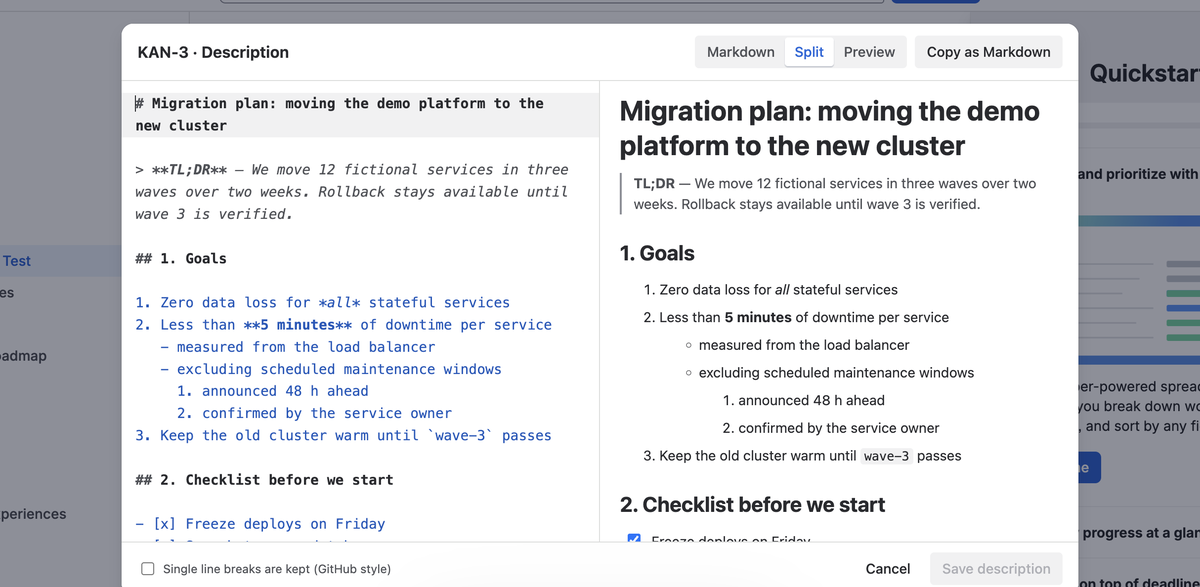
Paste Markdown, get real Jira formatting
Paste an answer from ChatGPT, Claude or a GitHub README. Headings, nested lists, task lists, tables, code and links are saved as native Jira content, and the preview shows exactly what Jira will display.
Nothing is lost on the way back
Open any description written in the Jira editor: mentions, status lozenges, dates, emoji and panels come back as readable Markdown, and saving writes the same content. Attachments and macros stay untouched.
Your content stays in Jira
The editor runs in your browser inside Jira and talks only to Jira, as you, with your permissions. No servers of ours, no storage, no tracking. Light and dark themes follow your Jira settings.
What it adds to Jira
Jira's editor is rich text only. If you think and write in Markdown, or you draft with an AI assistant, you end up re-formatting by hand. Markdown Mode for Jira adds two actions to the issue ••• (Actions) menu:
- Edit in Markdown: the issue description as Markdown, with a live preview.
- Comment in Markdown: add a comment, or edit one of your own, in Markdown.
Both save native Jira content, so colleagues without the app see normal Jira formatting in the issue, in e-mails and in the mobile apps. Copy as Markdown gives you the description or any comment as Markdown for your notes, GitHub or an AI prompt.
Jira-only elements (mentions, status, dates, panels, expands) become short, readable tags. Anything Markdown cannot express, like attachments or macros, is kept as a protected block and saved back unchanged. Before saving, the app warns you if someone changed the description in the meantime. If you are not allowed to edit an issue, the editor opens read-only.
How it handles your data
- The app is built on Atlassian Forge and runs on Atlassian's platform. It has no backend and no servers operated by PPFTEC.
- It reads and saves issue content through the Jira REST API, from your browser, as the signed-in user. PPFTEC never receives your issue content.
- It stores nothing outside Jira and sends no data to external services. It uses no analytics and no tracking.
- It keeps two display preferences (layout and line-break mode) in your browser's local storage.
Details: Privacy policy.
Requirements
- Jira Cloud, in the new issue view.
- Jira permissions requested by the app:
read:jira-workandwrite:jira-work. The app can only do what the signed-in user can already do in Jira.
See known limitations for what is not supported or not tested yet.