 PPFTEC
Atlassian Forge app for Jira Cloud
Team Components for Jira
Components for team-managed spaces: one managed list per space, searchable with JQL and ready for board filters.
Coming soon to the Atlassian Marketplace. 30-day free trial, then $6 per month for up to 10 users and $0.60 per user above that.
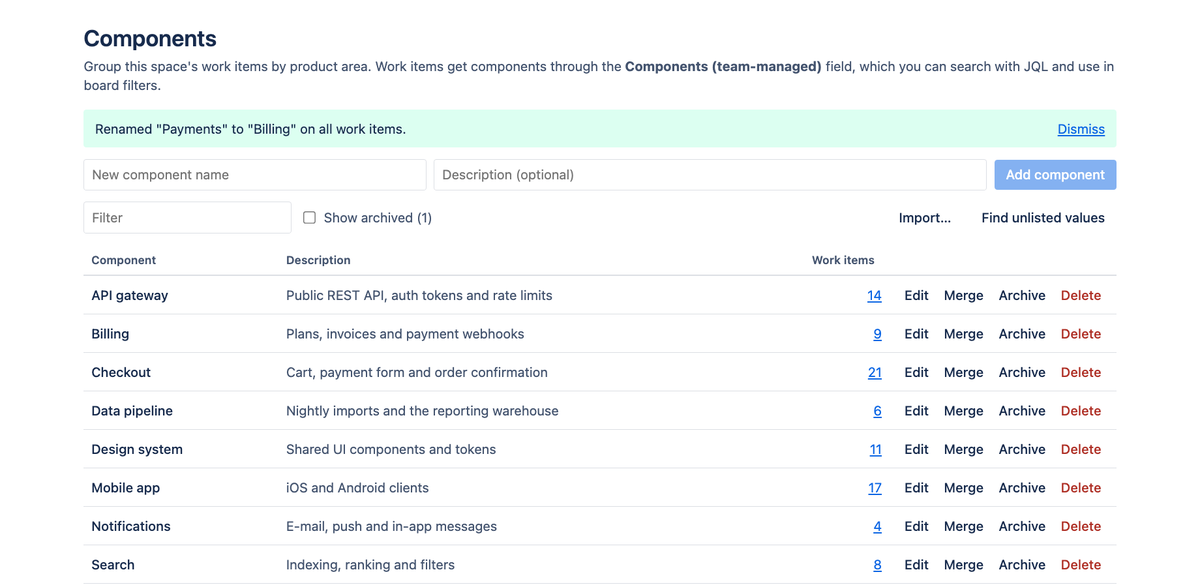
A component list for every space
Team-managed spaces have no Components field. Add one: space admins keep a list of components with descriptions, see how many work items use each one, and import existing labels.
Consistent names, searchable with JQL
Work items get components from a picker that only offers the space's list, so nobody mistypes a name. Search with JQL, save filters and add custom filters to your board.
Rename and merge safely
Rename a component or merge two of them and every work item is updated for you. Archive what you no longer use. If an update is interrupted, Resume finishes it.
What it adds to Jira
Jira's built-in Components field only exists in company-managed spaces. Teams on team-managed spaces fall back to labels, which anyone can mistype and nobody can rename. The request for components in team-managed spaces, JRACLOUD-92565, has more than 1,500 votes.
- Components (team-managed): a field you add to any team-managed space. It is searchable with JQL and works in saved filters and board custom filters.
- Space settings → Apps → Components: add, describe, rename, merge, archive and delete components, import existing labels, and find values that are not in the list.
- Safe bulk updates: renames, merges and deletions update every affected work item, can be resumed after an interruption and never touch other values.
How it handles your data
- The app is built on Atlassian Forge and runs on Atlassian's platform. It has no backend and no servers operated by PPFTEC.
- The component list is stored in Jira itself, as a property of the space. The chosen components are stored on the work items, in the app's field.
- The app calls the Jira REST API from your browser, as the signed-in user. PPFTEC never receives your data. No analytics, no tracking, no external services.
Details: Privacy policy.
Requirements
- Jira Cloud, team-managed spaces.
- Permissions requested by the app:
read:jira-work,write:jira-workandmanage:jira-project. The app can only do what the signed-in user can already do in Jira.